Wireless individual room control: valve, sensor and window without wiring
The EnOcean Gateway VL-700 BASE controls room temperature locally, room by room: actuators, temperature sensors, window contacts, presence detectors and room control units are assigned to each room, and the setpoints follow the schedule. Everything is wireless, without new wiring to the radiators—and all states are available to your building automation system via MQTT and a REST interface.
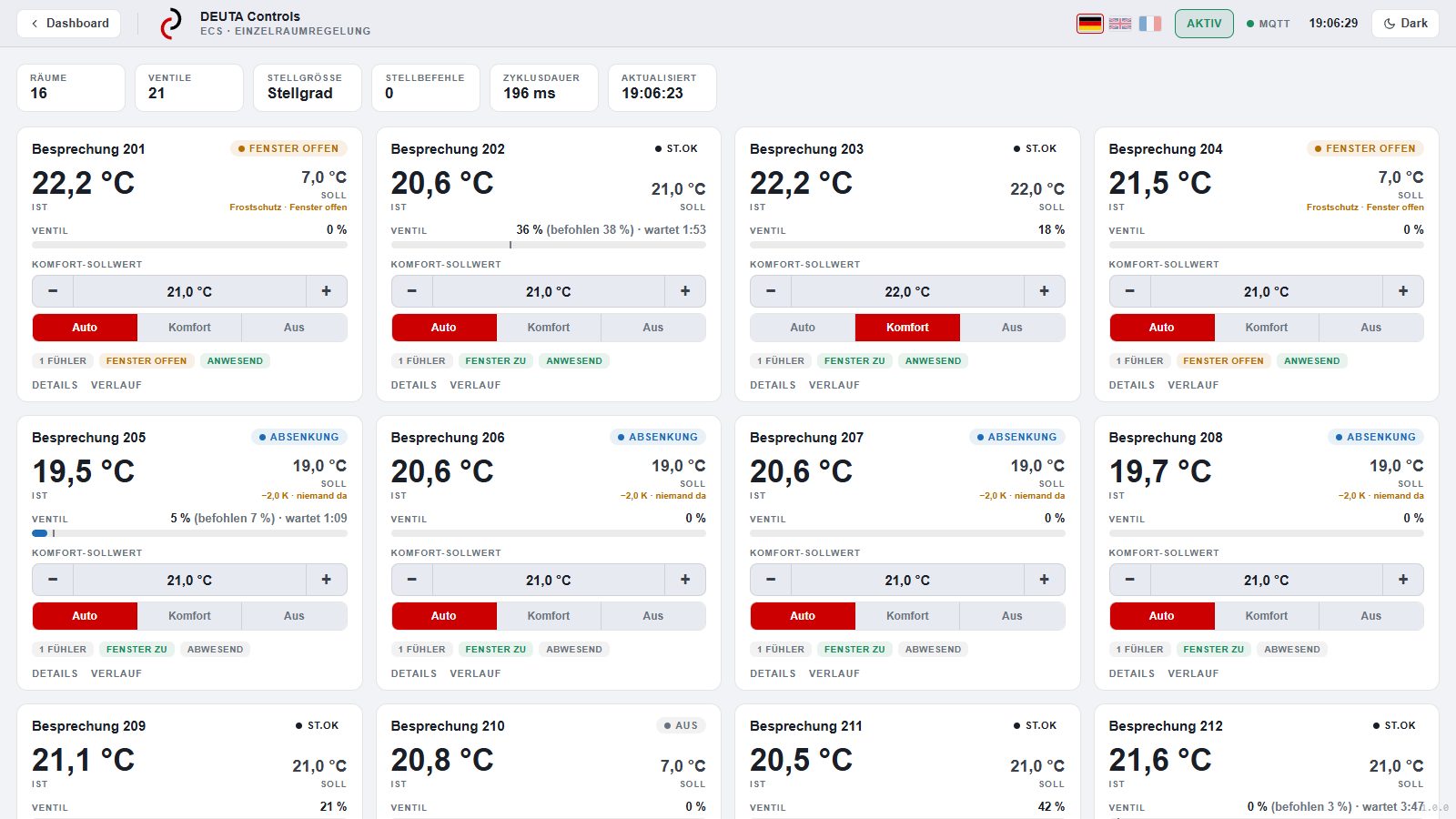
What works together in each room
The PrincipleEach room is assigned its own devices: one or more actuators on the radiator, a temperature sensor, the window contacts and, if desired, a presence detector and a room control unit. The control runs locally on the gateway—without the cloud, without a control centre, and even when the network is disconnected.
The window contact turns the heating down while the room is being ventilated; without a contact, the control detects an open window from the rapid drop in temperature. If the presence detector reports nobody, it lowers the setpoint. At the room control unit, occupants can adjust the setpoint by up to 3 kelvin up or down without changing the schedule.
Battery-powered, profile A5-20-01. Actuators with thermal energy harvesting can also be used; at low flow temperatures, for example with a heat pump, their energy is not always sufficient. Adapters for various valve brands.
Measuring range 0 to 60 °C, accuracy ± 0.3 °C, repeatability 0.1 °C. Battery-powered, no wires.
Detects movement from the side and front, and indicates whether the window is open or closed. The control system resets the room settings when the window is opened for ventilation.
Adjustment range: −3 to +3 °C around the programmed setpoint, for occupants in the room.
Each room as a tile on the dashboard
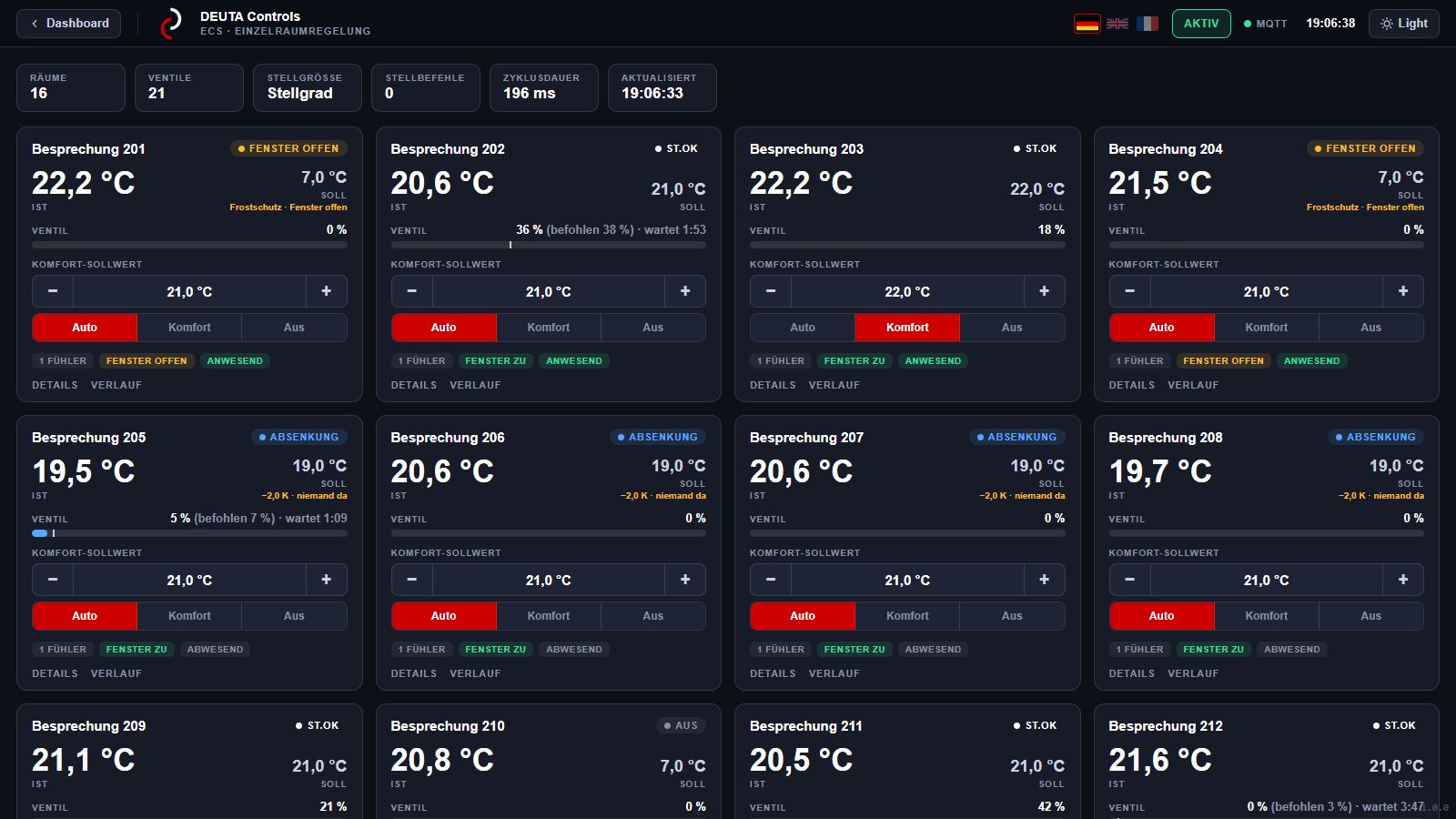
OperationIn the gateway's dashboard, each room has its own tile: actual temperature, setpoint, operating mode, valve position and the status of the window contact. Setpoints can be adjusted directly here. Each room has a seven-day schedule with heating times and setback, plus public holidays, preheating time, heating season and holidays. A log for each room records who changed a setpoint and when, and how sensors and actuators responded.
For commissioning and service, all data for up to 500 actuators, sensors, and room control units is available at any time: signal strength of received telegrams, device profile (EEP), EnOcean ID, raw data, and telegram counters.
What the valve indicates
Diagnosis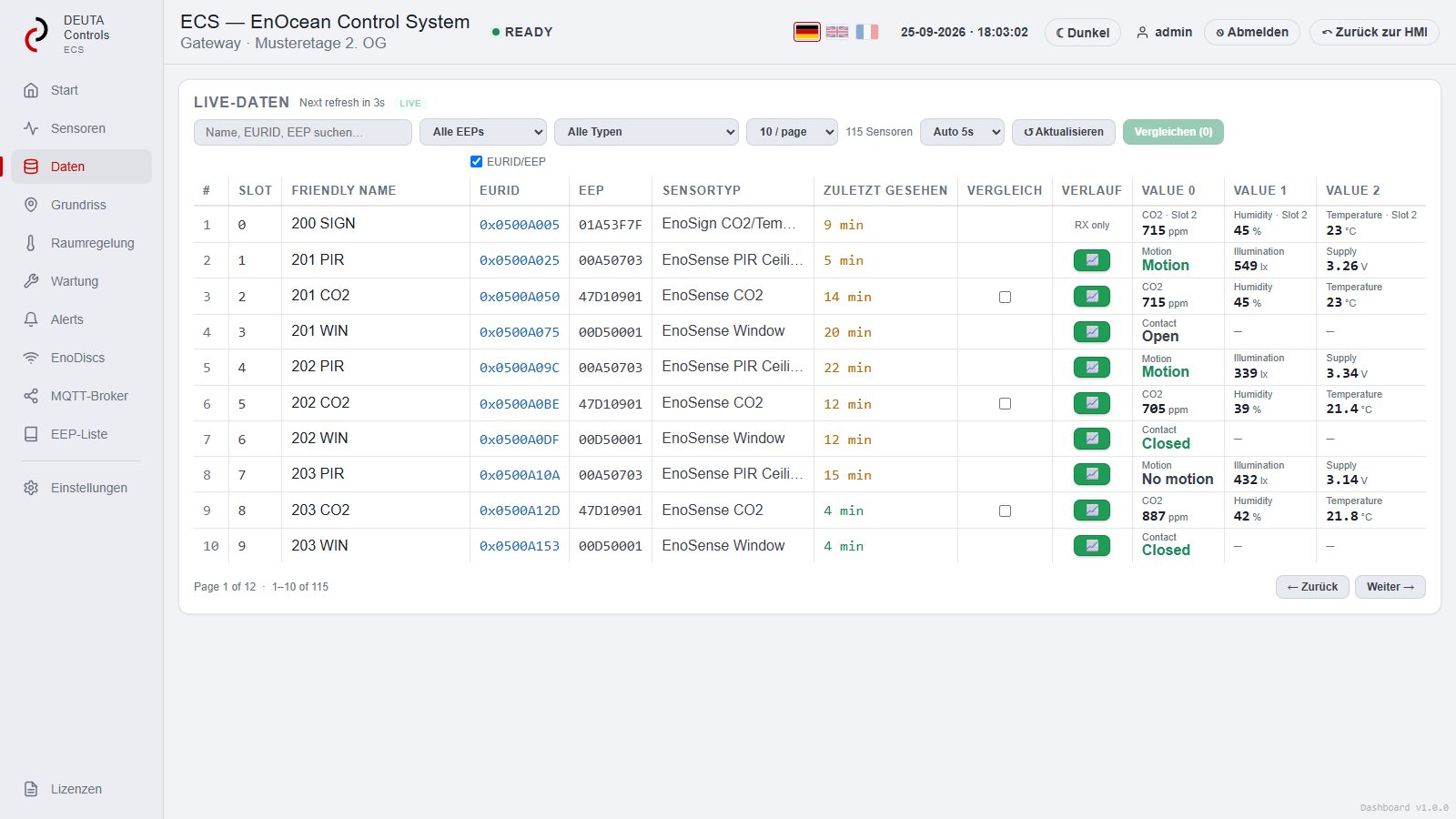
For diagnostic purposes, the user interface displays all available detailed information about the radiator valve: the actuator’s power status, the last reported opening level, the temperature measured at the actuator and the assigned room. It also displays the timestamp of the last telegram and the received data.
A drive that is silent stands out even before the room gets cold—the same logic applies to all of the system's sensors: signs of life, alarm list, power status.
Setup via a file instead of device by device
CommissioningRooms and their devices are assigned in the floor plan of the dashboard. For a large number of devices, the device list can be uploaded as a file via FTP or SFTP; for each device it contains the EnOcean ID, device profile and the name for the MQTT messages.
To send data to the actuators, enter the appropriate receiver—an EnoDisc® or an Aruba access point with an EnOcean gateway—as well as the EnOcean ID under which the gateway transmits. This file also serves as the system’s documentation.
Reading and Writing Data from Building Automation Systems
Connection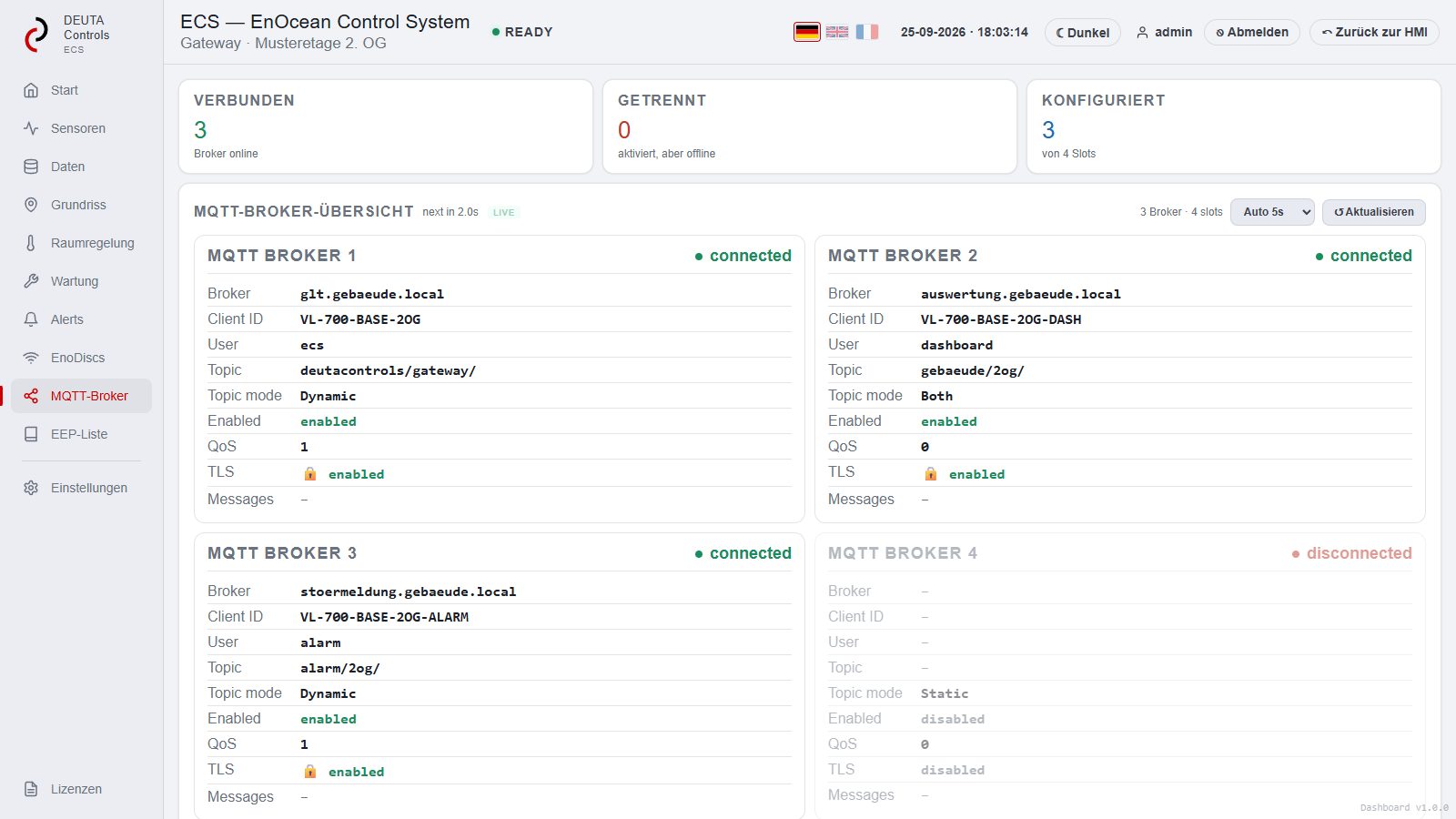
Setpoints, schedules and states of all rooms are available to a building automation system or a central control unit via a REST interface for reading and writing, and the states additionally via MQTT. The system thus operates independently while also allowing for integration into and expansion of an existing control system.
The gateway also transmits the measurement values from the connected sensors to your target system via MQTT, BACnet, and KNX. Integration of the control parameters for individual-room control via BACnet and KNX is in preparation—please ask us about the status for your project.
What this means for your request for proposals
5 points- For each room, specify: the number of radiators and the valve brand (for the adapters), the temperature sensor, window contacts, and whether a setpoint adjuster is desired.
- We agree the number of rooms per gateway with you; larger areas get several gateways, as with the sensor system one gateway per floor. If the heating runs at low flow temperatures, specify battery-powered actuators.
- Specify time schedules and setpoints for each room—they will be configured during commissioning.
- Specify the data path to the control system: REST or MQTT for control parameters, MQTT, BACnet, or KNX for measured values.
- List commissioning and configuration as a separate, chargeable item; require the configuration file as part of the documentation.
Frequently asked questions
5 questionsIs individual room control mandatory?
In Germany, yes, for heating systems with water as the heat transfer medium. Under Section 63 of the Building Energy Act (GEG), such a system must have an automatic device for room-by-room control of the room temperature; existing buildings must be retrofitted. In non-residential buildings, group control is permitted for rooms of the same type and use.
Does the control work without the internet?
Yes. The control runs locally on the gateway. A connection to the cloud or the building management system is not needed for operation, only for remote access and analysis.
What happens when a window is opened?
The window contact reports the open window, and the control turns the heating down until it is closed again. Without a contact, it detects the open window from the rapid drop in room temperature.
How are the valve actuators powered?
We prefer to use battery-powered actuators. Actuators with thermal energy harvesting are also possible; they draw their energy from the heat of the radiator, and at low flow temperatures this is not always enough.
How many rooms can one gateway control?
That depends on how many devices are planned per room; one VL-700 BASE manages up to 500 EnOcean devices. We work it out for your project based on the floor plan.
Shall we go over your rooms?
Please send us the floor plan, the number of radiators, and the target system. You will receive a recommendation for actuators, sensors, and gateways, a list of part numbers, and a quote.
Images: ECS Dashboard v1.0 featuring the sample floor (fictitious floor plan). As of September 25, 2026.